
About Battle Area
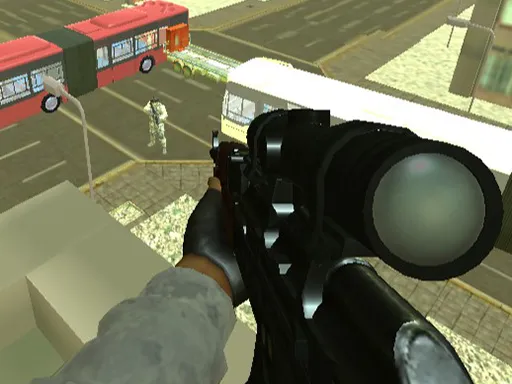
Enemies have grabbed a mineral mine on Mars, and the job of taking it back falls to you, a lone elite soldier. The mission is clear: remove every enemy and recapture the site, all from a first-person view in full 3D.
Battle Area plays on both desktop and mobile, with controls built for each. On a computer, walk with the arrow keys or WASD and use the mouse to turn, aim and shoot. On a phone, a virtual joystick handles walking, a fire button handles shooting and you swipe across the right half of the display to look around. It loads in the browser, free of charge, and without a download.
Game details
| Genre | Shooting |
|---|---|
| Controls | Keyboard + mouse or touch |
| Platform | Browser, phone and tablet |
| Cost | Free, no download |
| Screen | 800 x 450 px |
How to play Battle Area
- On desktop, move with WASD or the arrow keys.
- Use the mouse to aim, turn and shoot.
- On mobile, push the joystick to walk and press the fire button when you are lined up.
- Swipe across the right half of the display to turn and aim, then eliminate every enemy.
Tips for Battle Area
- Slow, small mouse movements keep your aim steady in a firefight.
- On mobile, rest your thumb near the joystick and use your other hand to aim.
- Clear one area at a time before moving deeper into the mine.
Frequently asked questions
Is Battle Area free?
Yes. Battle Area is free to play in your browser, with no download and no sign-up.
Can I play Battle Area on my phone?
Yes. On mobile a virtual joystick walks you around, a fire button shoots, and swiping the right half of the display turns and aims.
What is the mission in Battle Area?
A mineral mine on Mars has been seized. You are the soldier sent to clear out every enemy and win the site back.
More to play: Shooting games · 3D games · Action games · Boys games · Shooter games






💬 Comments