
About Good Guys & Bad Boys Zombie Survival GUI
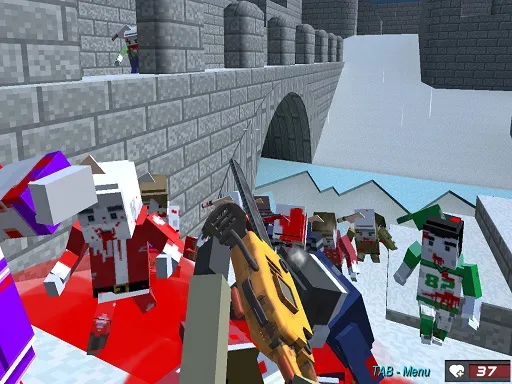
Zombies keep coming and your only plan is to stay alive one round at a time. Good Guys & Bad Boys Zombie Survival GUI is a Unity-built shooter where you move, aim and fire, switch weapons as needed and keep an eye on where the enemies are closing in.
Controls follow the usual PC shooter layout: WASD for movement, the mouse for aim and fire, Space to jump and Tab for the menu. Managing your guns matters as much as accuracy, because the right weapon at the right moment keeps you alive. Rounds feel quick, and each new wave tends to test how well you handled the last.
Game details
| Genre | Shooting |
|---|---|
| Controls | Keyboard + mouse or touch |
| Platform | Browser, phone and tablet |
| Cost | Free, no download |
| Screen | 800 x 600 px |
How to play Good Guys & Bad Boys Zombie Survival GUI
- Move with W, A, S and D.
- Aim with the mouse and click to shoot.
- Change guns and press Space to jump.
- Press Tab to open the menu.
- Survive the zombie waves.
Tips for Good Guys & Bad Boys Zombie Survival GUI
- Switch weapons before enemies reach you, not after, so you are never caught with the wrong gun.
- Keep moving with WASD while you aim; standing still lets zombies close the gap.
- Jump with Space to reposition when the horde bunches up.
Frequently asked questions
Is Good Guys & Bad Boys Zombie Survival GUI free to play?
Yes. It is free, runs in your browser, and needs no download and no sign-up.
What are the controls in Good Guys & Bad Boys Zombie Survival GUI?
WASD moves you, the mouse aims and shoots, you can change guns, Space jumps and Tab opens the menu.
What is the goal in Good Guys & Bad Boys Zombie Survival GUI?
Outlast zombie waves by shooting, moving and managing your weapons.
More to play: Shooting games · Action games · Shooter games · Zombie games
Popular topics: mentolatux · shoot · survival








💬 Comments